International Students
If you are studying at Bates on an F-1 Visa, you are eligible to work for Bates College in an on-campus position.
See the International Students Employment Flowchart to assist you in navigating this process
Per Federal immigration regulations, students in valid F-1 status are eligible to work up to 20 hours per week during the academic year, while classes are in session. The maximum hours are cumulative across all jobs, not per job. Bates is required to report work which is over the maximum limit. Pay careful attention to your hours worked and do not exceed the 20-hour per week maximum, as this is a violation of your legal status and could have serious consequences for your SEVIS record.
Students may work 40 hours at maximum during official school breaks of at least one full week and summer vacation, including approved Curricular Practical Training (CPT). The maximum hours are cumulative across all jobs, not per job. Exceeding these restrictions would require you to be paid overtime, which comes from the department you’re working for. Departments typically do not intend to pay overtime, so it is important to check in with all supervisors before working these hours.
You will need a U.S. bank account. If you already have a U.S. bank account, check out the Direct Deposit section of the Student Employment Handbook and set yours up in Garnet Gateway.
Steps for Employment for International Students:
- Apply for on-campus jobs via Handshake. This access is given the summer before their freshman year in August and does not have to be renewed.
- Once you have been offered a position and a hiring transaction has been submitted by your supervisor, the Student Employment Office will contact you regarding employment forms and International Tax Status Analysis (sprintax)
- The Student Employment Office will notify the Designated School Official (DSO) in the Center for Global Education with confirmation of your position and supervisor.
- Students need to contact the DSO to request an F-1 Status Verification Letter, which is required in order to apply for a U.S. tax ID, called a Social Security Number (SSN)
- All international students must have a U.S. social security card to work on campus. You do not have to wait until you have your social security card to apply for jobs, but must apply for one within 30 days of receiving your first paycheck.
- The Student Employment Office must receive a copy of your SSN card within 60 days after your first paycheck date, otherwise your campus employment will be terminated until SEO receives your SSN copy.
- More detailed information about tax ID numbers may be found on the Taxes & Social Security Numbers webpage.
To receive the F-1 Status Verification Letter, and to begin the SSN application process, please contact DSOs Shelley Palmer or Dari Jigjidsuren at globaleducation@bates.edu.
The Office of Global Education is located in Roger Williams Hall room 124.
Sprintax Information
SEO sends all international students access to their Sprintax account in August before their first year. You should set this up and complete the Tax Status Analysis upon receiving the email regardless of your plans to work on campus. Even if you do not intend on holding a student employment position, the Tax Status Analysis is essential for tax purposes on any scholarships, awards, prizes, or other money you may receive from Bates.
The Tax Status Analysis must be completed each year or upon any change of immigration status. Please use the Sprintax guide to answer common questions, or the Sprintax manual as you fill out your profile.
Please note that this Sprintax profile is used to determine how we tax you and is different from the tax filing software that the dean in Global Education sends you.
Once you are hired, if you have not already set your account up, SEO will send you an activation email to log in to your Sprintax account.
Please review and sign the tax forms that are generated once you enter all required information. In order to sign the tax forms, you will be prompted to Download the Google or MS Authenticator mobile app, scan the QR code Sprintax generates, and enter an authentication code generated by the app. Information regarding the 2FA process can be found on our Sprintax 2FA Information section below. Completed forms can be electronically signed using the e-sign functionality.
If you are applying for an on-campus job, once we receive the Adobe Sign Forms and you have completed your Sprintax account we will send you an email to set up an appointment with us. We will have tax forms for you to sign. You will then contact the DSO in the Center for Global Education to begin the process to apply for your Social Security Number (SSN).
Signing in to Sprintax
The Sprintax login page looks like below.
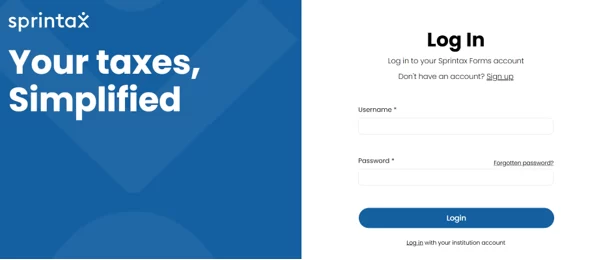
Your Bates email is your username, and you will be prompted to set up your password. Log in to your profile to add your personal information. For more information or questions, you can utilize the Live Chat feature in Sprintax or contact the Payroll Office at payroll@bates.edu.
Sprintax Answer Guidance: FAQs
Answer “yes” to applying for a social security card and that you are legally authorized to work in the US.
Which Income Codes should I use?
As a student you will potentially receive payments associated with Income Codes 16 (fellowship/scholarship), 20 and 23 (awards). Estimate an amount for each. If you have no idea, put $100.00. This information will be used to complete your tax status analysis to determine your tax residency status for the upcoming year.
What documents may I need to refer to complete my profile?
You may need your Employment Authorization Card – I-766 (I-20), Notice of Action-I-797, Visa, passport, SSN, and/or US TIN.
What do I enter as the date I intend to leave the US/final departure date if I do not exactly know?
Enter the Program End Date on your F-1 Form I-20.
What do I enter for my US Address?
Your US Address is your PO Box from Post and Print.
Sprintax 2FA Information
Setting up your 2FA:
In order to sign the tax forms, you will be prompted to Download the free Google Authenticator or MS Authenticator mobile app, scan the QR code Sprintax generates, and enter an authentication code generated by the app. This is the first time it pops up to link your account to your app, then when you go to actually sign the form you will need to enter a code from the app.
No additional account is created when setting up your Authenticator account; simply use your Bates Google/Microsoft account when opening the app.
It is best practice to keep your authenticator app on your mobile device throughout your time as a Bates student. You will need to use 2FA each time you log in to Sprintax with a different code the app provides. If at any point you delete the app or accidentally remove Sprintax from your authenticator app, your password will likely need to be reset.
If you need to reset your 2FA:
Contact us. We will send you a link to reset your 2FA to your Bates email. For further assistance, check out our guide for resetting your MFA/2FA in Sprintax.
Authenticator App Options
You will need to choose one of these two apps to connect to your Sprintax account.
Google Authenticator
MS (Microsoft) Authenticator