Faculty Meeting Records
In order to facilitate research of faculty policies and procedures and to comply with the faculty legislation requiring the Secretary of the Faculty to, “keep on file in the Office of the Dean of the Faculty copies of all faculty minutes,” the Dean of Faculty’s Office and the Muskie Archives have created an accessible, searchable repository of faculty meeting materials.
Access
The link below allows faculty to access the agenda, minutes, and materials provided for each faculty meeting from September 1950 to the present, as well as an index to all pieces of legislation.
- The files are in pdf format and stored on a shared Google drive.
- Each academic year has a folder and each meeting of that year can be found within that folder with a pdf of the full packet of meeting materials.
- A pdf of the full meeting packet will be named with the day, month and year it corresponds to (e.g. 7 OCT 2025). Some meeting folders contain multiple files when the meeting packet was originally provided to the faculty as multiple single documents.
- Meeting minutes are stored with the meeting which they were voted on (e.g. minutes for a September meeting will be found with the October meeting packet).
- Files may not be modified and should not be shared outside the faculty.
- Additional academic years will be added as resources allow.
- Alternatively, the files may also be accessed directly through Google Drive by clicking on “Shared Drives” and then “Faculty Meeting Records.”
Please note: The files have been redacted to remove FERPA protected student information.
Searching
Searching for a date or particular phrase in the faculty meeting records can be accomplished through the search field at the top of the Google screen.
Detailed Search Instructions
- Advanced searching is recommended by selecting the “Faculty Meeting Records” drive as the only file to search.
- Access Advanced Searching by using the search icon found on the right edge of the search field.
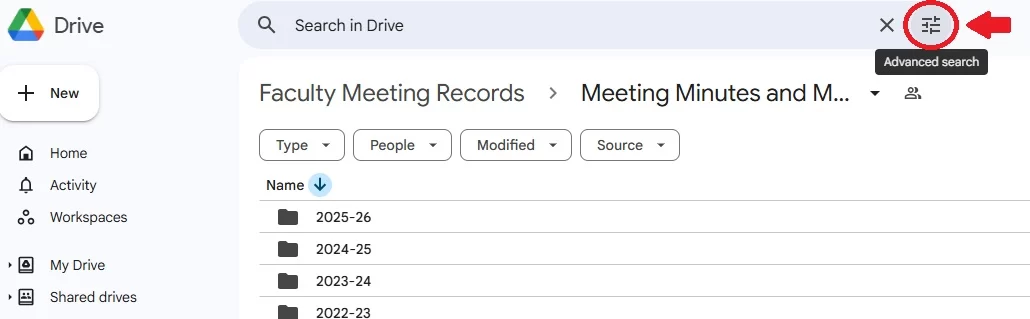
- In the Location field, use the pull down to navigate to the shared drive “Faculty Meeting Records.”

- You’ll then see this dialogue box. Enter your search phrase in the “Has the words” field and click on “Search.”
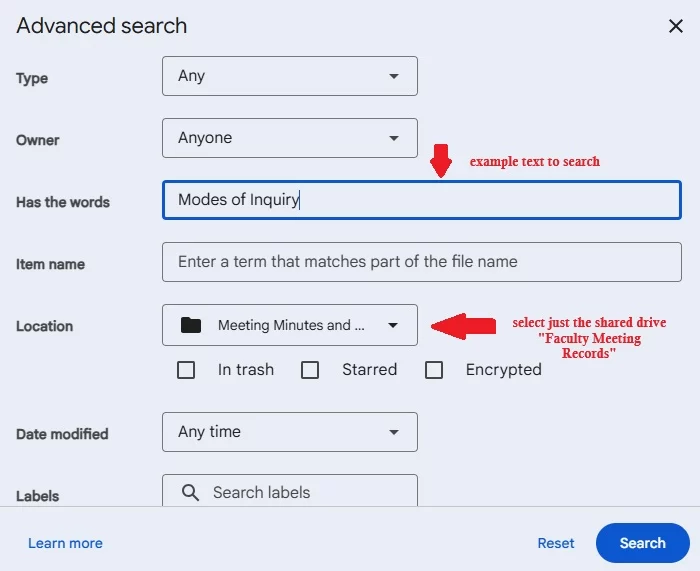
- A list of all the files in the “Faculty Meeting Records” folder with your search word/phrase will then come up.
List of Committee Abbreviations
Questions may be directed to:
Mary Meserve, Assistant Dean of Faculty
or Sam Howes, Reference & Digital Initiatives Archivist