Direct Deposit – Accounts Payable Payments and Reimbursements
Direct deposit for non-payroll payments and reimbursements paid through Accounts Payable are available for students, faculty and staff.
Direct deposit information can be set up in Garnet Gateway by navigating to General/Payments and Deposits/Direct Deposit. This Direct Deposit Set up Guide will show you the steps to setting up your direct deposit account.
Please see the FAQ’s below or contact us for further assistance.
Frequently Asked Questions
When will my direct deposit funds be available?
Disbursements through Accounts Payable are processed weekly and you will receive an email sent to your Bates email address notifying you of the deposit.
Can I set up multiple accounts for my direct deposit?
Only one account can be designated to receive your Accounts Payable direct deposit.
I have multiple bank accounts for payroll, how do I know which one will receive Accounts Payable payments?
You can view your direct deposit information in Garnet Gateway by navigating to Home/Account & Access/Finance/Direct Deposit, where you will see your Accounts Payable Deposit account information. If an Accounts Payable Deposit account does not appear, please add your bank account information. This Direct Deposit Set up Guide will show you the steps to setting up your direct deposit.
How do I add or change my direct deposit account for Accounts Payable payments?
To add an account, complete the Add Bank section with the following information: Bank Routing Number, Account Number, Account Type; then click the Accounts Payable Deposit box.
If an Accounts Payable Deposit account already exists, you will need to first select the bank name in the Accounts Payable Deposit section and remove the Accounts Payable indicator before a new bank can be added.
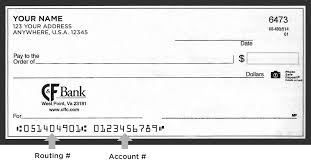
Where do I find my routing number and account number?
Your bank routing number and account number are located at the bottom of your check, see example below. You may also contact your bank branch location where your account was opened to obtain the information.
What type of account can I use for direct deposit?
Direct deposit is available for domestic bank accounts only and can be either a checking or savings account.
My bank account was closed, but a direct deposit was already processed. How do I get my reimbursement?
If your banking information is not current or your account has been closed, you will receive a payment by check until new or updated information is entered in Garnet Gateway. Please see “How do I add or change my direct deposit account for Accounts Payable payments?”
What should I do if I still have questions?
Please contact us for further assistance or email accounting@bates.edu.